


Fotocast - Weather Forecast fo
3.975.00 Reviews
App Specs
- Version
- 3.4.5
- Updated On
- License
- Free
- Downloads
- 10,000+
- Developer
- Dunbar Technology, LLC
- Categories
- Weather
- Platform
- Android
Screenshots
 Analysis by AppCompare
When I first tried Fotocast, I was curious whether a weather app aimed at photographers would feel useful beyond a quick novelty. Its visual approach and photography-focused guidance give it a clearer identity than another screen of temperatures, but the real test is whether those details help me make better plans repeatedly. After the initial appeal, I’d judge it by how naturally it fits into the decisions I already make: when to leave, what to bring, and whether conditions are worth working around.
Who gets the most from a photo-minded forecast
I’d start with Fotocast if weather affects what I want to photograph, rather than simply what I wear. A landscape photographer deciding whether to head out at dawn, someone planning a family portrait outdoors, or a casual phone-camera user hoping for interesting light can all benefit from looking at conditions with a creative purpose. Its photography tips give the forecast a different angle: they encourage me to think about what the weather might make possible, not just what it might spoil.
That focus is also a useful filter. If I only want a fast temperature check before walking the dog, a basic weather app may be simpler and less distracting. If I need a broad, familiar dashboard for several household members, my usual general-purpose option may remain the one I open most often. Fotocast makes the most sense when weather and photography regularly meet in my plans; it does not need to replace every other forecast tool to earn a place on my phone.
A practical routine for deciding whether to go
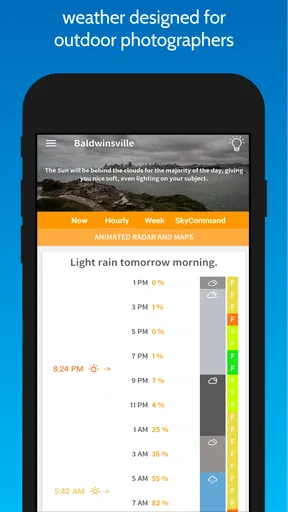
For a planned photo outing, I’d use the app as a sequence rather than treating one forecast screen as a final answer. First I’d check the hourly outlook around the time I expect to arrive, then look at the radar for approaching rain, and finally consider the photography guidance in light of the scene I have in mind. A cloudy forecast might be disappointing for a bright, high-contrast look but useful for softer portraits; changing conditions can also make it sensible to bring a cover for the camera and keep a nearby indoor alternative in mind.
That is a more realistic use than expecting any weather app to guarantee a perfect shoot. Forecasts are guidance, not promises, and local conditions can change between checking the screen and reaching a location. I’d check again before leaving if the plan depends on a narrow weather window. For a long drive or a hike far from shelter, I’d also use sound judgement and consult a suitable source for the specific risks involved rather than relying on a single app view.
How it fits beside ordinary weather apps
Most general weather apps are built around everyday decisions: temperature, rain, and alerts. Fotocast has a more specialized reason to open it, because it connects weather information with photographic planning. That distinction is valuable when I’m deciding whether conditions suit a particular shot, but it does not automatically make it the best choice for every kind of weather check. Someone who mainly needs a familiar glance at the day’s conditions may prefer a simpler layout, while a photographer can appreciate having creative considerations in the same routine.
I would treat it as a complement if my existing app already handles my everyday needs well. Keeping two weather apps only pays off when each has a clear job: one for a quick household check, the other when I’m thinking about a camera outing. If I find myself opening Fotocast without using its photo-oriented perspective, that is a sign the extra app may not be earning its space.
Worth Reading Before You Choose

Flipboard Shows What News Apps Must Do Beyond the Feed

Switching to Android Auto Means Rethinking Your Driving Routine

Google Calendar Makes a Crowded Week Easier to Manage

Ludo King Makes the Most of the Minutes Between Plans

Baby Panda World Brings Quick Play to Modern Phones, but Its Game Library Feels Busy

ESPN’s Live Game View Makes Following Close Games Easier
Cost, compatibility, and expectations
Fotocast is a free weather app from Dunbar Technology, LLC, with optional in-app purchases listed from $1.99 to $59.99 per item. I’d begin with the free experience and decide whether it suits my habits before considering any purchase. The range is broad enough that I would read the purchase details carefully in the app rather than assume every paid option has the same purpose or value. It is rated for Everyone, has a 3.9 average from around 350 ratings, and has passed 10,000 installs, so it has an established audience without being one of the category’s ubiquitous defaults.
The app first appeared on September 6, 2017, and its current version is 3.4.4. It requires Android 6.0 or later. Those details matter if I’m setting it up on an older device or deciding whether to recommend it to someone who uses a different platform; I’d check compatibility in the relevant app store before planning around it. I’d also allow a little time to learn which forecast views and photography suggestions I personally find useful, instead of expecting the best routine to be obvious on the first launch.
Ever find yourself caught in an unexpected downpour because your weather app was a bit too optimistic? Enter Fotocast, the weather forecasting app that might just become your new best friend when planning that outdoor picnic or deciding whether to take an umbrella to work.
Getting to Know Fotocast
So, I decided to give Fotocast a whirl, and let me tell you, it's not your average weather app. From the moment I opened it, I was greeted with a sleek and user-friendly interface. It’s like having a personal meteorologist in your pocket, and who doesn’t want that?
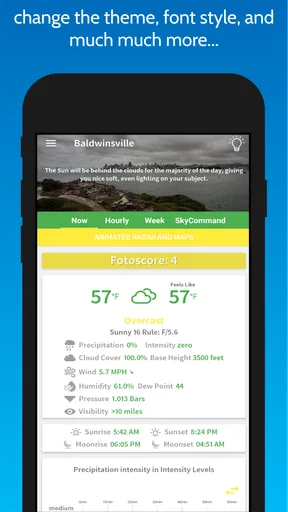
One of the first things that caught my eye was the app’s vibrant and clear design. You’re not just looking at boring numbers and icons; it’s almost like the weather is being painted for you. The visuals are intuitive, making it easy to quickly understand what’s going on outside.
Features That Stand Out
Now, let’s dive into the goodies. Fotocast isn’t just about telling you if it’s going to rain. It offers a plethora of features that make it stand out in the crowded market of weather apps.
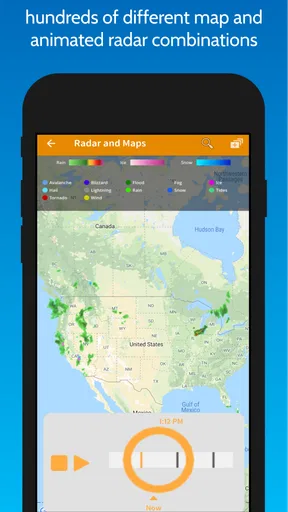
- Real-time Radar: The app provides an impressive real-time radar feature. You can zoom in and out to see weather patterns sweeping across regions. It’s perfect for checking whether that ominous cloud is heading your way.
- Detailed Forecast: Not only do you get a daily forecast, but Fotocast also breaks it down into hourly predictions. That’s right, you can plan your day down to the very hour. No more surprises!
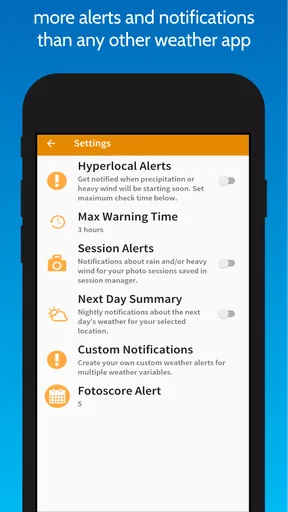
- Weather Alerts: Stay ahead of the storms with timely notifications. The app alerts you about severe weather conditions, ensuring you’re prepared for whatever Mother Nature throws at you.
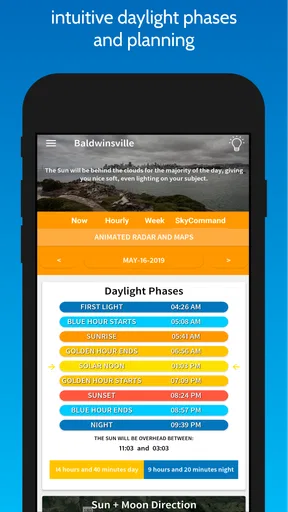
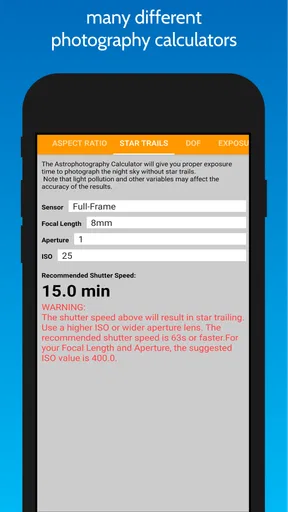
- Photography Tips: This feature is a game changer for shutterbugs. Fotocast offers photography tips based on current weather conditions, helping you capture that perfect shot.
Using Fotocast: A Personal Experience
Okay, so how does it perform in real life? I took it for a spin over a week, and I’ve got to say, it’s pretty spot-on. I used the hourly forecast feature to plan a weekend hike, and it accurately predicted a midday drizzle. Thanks to Fotocast, I packed a rain jacket and avoided getting soaked.
The real-time radar also came in handy when I was planning a road trip. Watching the weather patterns in motion gave me a heads-up on when to hit the road to dodge some heavy rain.
What's the Verdict?
So, is Fotocast worth the download? Absolutely. With its user-friendly design, detailed forecasts, and unique photography tips, it’s a fantastic tool for anyone who loves being one step ahead of the weather. Whether you’re planning a day at the beach or just trying to get to work dry, this app has got you covered.
In a world where the weather can be as unpredictable as my cat’s mood, having a reliable weather app is crucial. Fotocast doesn’t just predict the weather; it helps you plan your life around it. Give it a try, and you might find yourself wondering how you ever lived without it.
What keeps it useful after the first week
The first few times I opened Fotocast, the visual forecast and photography angle were the obvious draws. Lasting value is less about being impressed once and more about whether I remember to consult it when a real decision is coming up. I’d make that habit lightweight: check the hourly conditions the evening before a planned shoot, then use radar shortly before leaving if rain could change the route or timing. That gives the app a clear role without turning weather checking into a project.
A useful habit is to tie the forecast to a specific choice. Instead of repeatedly refreshing it, I might ask whether I should leave earlier, pack a rain layer, or choose a more sheltered location. For a casual outing, one check may be plenty. For a planned landscape session, a second check closer to departure can help me avoid committing to a long trip based on an earlier snapshot. The trade-off is simple: the more exact the plan, the more I need to treat the forecast as something to revisit rather than a guarantee.
Small workflow choices that make a difference
I’d avoid making the photography tips a substitute for thinking about the subject. A weather suggestion can prompt an idea, but the best choice still depends on the light I want, the location, and how much flexibility I have. If I’m photographing people, overcast conditions may be welcome; if I’m after a particular landscape mood, the same conditions could be a reason to wait or change the scene. The tip is most useful as a nudge that helps me interpret conditions, not as a rule that every photographer should follow.
Radar is most actionable when I use it to answer a narrow question, such as whether a rain band appears to be moving toward the area I plan to visit. I wouldn’t read a still moment on the map as certainty about what will happen at a precise spot later. For an outing with a fixed start time, checking the hourly forecast and then using radar as a near-term cross-check is a more sensible workflow than trying to infer the whole day from radar alone.
There is also a practical reason to keep the app’s role modest: the weather is only one part of a successful photo trip. Travel time, access to the location, daylight, and whether I can safely wait out a shower all matter too. I’d use the forecast to narrow my options, then choose a plan with an easy fallback. That makes the app helpful even when the sky does not cooperate, because I can still decide whether a nearby subject or a shorter outing is worth the effort.
When the forecast is not enough
For ordinary errands, a quick forecast and an alert can be reassuring, but I would not treat any consumer weather app as a replacement for local emergency guidance. If severe weather is possible, safety information should take priority over photography plans or a radar animation. Likewise, anyone making a high-stakes decision about travel or outdoor work should check the sources appropriate to that activity. Fotocast is most comfortable as a planning companion for everyday conditions, not as a promise that every change will be caught in time.
Its specialist focus can also become a source of fatigue. If I do not take photos regularly, the photography angle may feel like extra context around a task I wanted to finish quickly. And if I already rely on another app for alerts or familiar local forecasts, I may hesitate to split my attention between two places. I would keep it only if I actually use its photo-minded perspective; otherwise, a single general weather app is the cleaner daily habit.
The month-to-month test
After the novelty fades, I’d judge Fotocast by a few ordinary moments: whether it helps me decide to carry a jacket, whether radar changes my departure time, and whether the photography suggestions inspire a useful alternative when conditions are less than ideal. Those small decisions are a better measure of recurring value than how attractive the screen looked on the first day. If I use it for planned shoots and outdoor weekends, it has a distinct job. If I only open it to check the temperature, its specialized approach may not justify keeping it beside a simpler option.
My recommendation is therefore selective rather than universal. Fotocast is worth trying for photographers and visually minded outdoor planners who want weather information connected to the choices behind a shoot. I’d skip it if I want only the fastest possible glance, or if I need one app to serve as my sole source for critical warnings. For the right routine, its best long-term quality is not that it makes the weather predictable; it helps me make a more thoughtful plan when it isn’t.
Pros
- Detailed weather forecasts with hourly updates.
- Beautiful and intuitive user interface.
- Customizable notifications for weather alerts.
- Interactive weather radar for precise tracking.
- Minimal battery usage despite real-time updates.
Cons
- Limited language options available.
- Some features require in-app purchases.
- Occasional lag in radar loading.
- Ads can be intrusive for free users.
- Requires constant internet for full functionality.
FAQs for Fotocast - Weather Forecast fo
What is Fotocast and how does it differ from other weather apps?
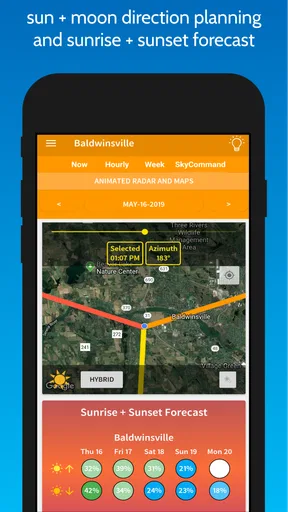
Fotocast is a weather forecasting app designed specifically for photographers. Unlike traditional weather apps, Fotocast provides detailed insights into weather conditions with a focus on optimal lighting and environmental factors for photography. It offers features like golden hour alerts, cloud cover predictions, and sunset times to help photographers plan their shoots effectively.
Does Fotocast offer real-time weather updates?
Yes, Fotocast provides real-time weather updates to ensure photographers have the latest information. It uses advanced weather models to deliver accurate data, including temperature, wind speed, and precipitation forecasts. This allows users to make informed decisions on whether conditions are ideal for photography sessions.
Is Fotocast available for both Android and iOS platforms?
Fotocast is available for both Android and iOS devices, making it accessible to a wide range of users. The app can be downloaded from the Google Play Store and the Apple App Store, ensuring that photographers using different devices can benefit from its specialized weather forecasting features.
Does Fotocast support location-based weather forecasts?
Yes, Fotocast supports location-based weather forecasts, allowing users to get precise weather information for their specific location. By enabling location services, the app tailors its forecasts to the user’s current area, providing detailed weather data and alerts specific to that location, which is crucial for planning photography shoots.
Are there any in-app purchases or subscriptions required for Fotocast?
Fotocast may offer in-app purchases or subscription options to access premium features. While the basic version is typically free, users can opt for a subscription to unlock advanced functionalities such as extended forecasts, additional alerts, and more detailed weather insights, enhancing the overall user experience.


